

Job hunting in the 21st century heavily relies on networking. An estimated 80% of jobs are found through networking. Also, social media presence for employers is crucial for them to check.
When it comes to networking online, LinkedIn is one of the most visited websites by both job seekers and recruiters. From the early 2000s, the company started offering job opportunities from different companies and created a platform where a job seeker and a recruiter can interact.
LinkedIn Open to Work feature was launched in June 2020 to make job search easier for job seekers. This blog will take you through the importance of the feature, how to use it, and a few other ways you can notify recruiters that you are open to work.
What Does It Mean When You Use Open to Work on LinkedIn?
Using LinkedIn’s open to work feature in 2025 means you are indicating publicly or privately to recruiters and your network that you are open to new job opportunities. While most of you are aware of the feature, the one thing you might not be aware of is that when you activate this feature, the green frame with a ‘Open to Work’ badge around your profile photo increases your visibility.
Now, activating the feature only will not be of any help. You need to specify your job preferences, like titles, locations, and job types. Further, you need to decide whether you want this to be visible to all LinkedIn members, just recruiters, or just hiring managers. Numerous candidates hire LinkedIn profile writing experts to ensure their profiles are updated and that they can grab the attention of recruiters as soon as they turn on the feature.
The ‘Open to Work’ feature is created to help you stand out from the crowd and signal your readiness for new roles. This will expedite the job search process and can get you the opportunity to interview for an appropriate role. However, if you are working and want to keep it discreet, choose the private setting to ensure that only recruiters can see the badge.
How Has Open to Work on LinkedIn Changed from 2020 to 2025?
The open to work feature on LinkedIn has not changed fundamentally from 2020 to 2025. The features, the green badge, and the privacy settings remain the same. So, what has changed exactly? The answer is how it is perceived and utilised. Here are a few things that have changed over time:
- LinkedIn added clearer prompts to set job preferences, like titles, locations, work type, start date, and other filters, to improve matching with job roles.
- The usage of this feature has grown significantly, with hundreds of millions of members having turned on the feature.
- Recruiters’ perception towards the badge has changed, from seeing it as a sign of desperation to seeing it as a sign of availability.
- Experts have also talked about how the green open to work frame should be used strategically. Candidates are advised to optimise their LinkedIn profile first, target specific roles, and choose visibility based on the risk level. Further, they must also know how to add a promotion on LinkedIn to make their profile stronger.
- The opentowork feature has shifted from a solution to a crisis to a strategic part of personal branding and job search on LinkedIn in 2025.
Undeniably, the feature can introduce you to new opportunities and help you get connected with a recruiter. You can also look at a few LinkedIn headline examples to make your profile better and improve your chances of getting hired.
The Pros of #OpentoWork Frame
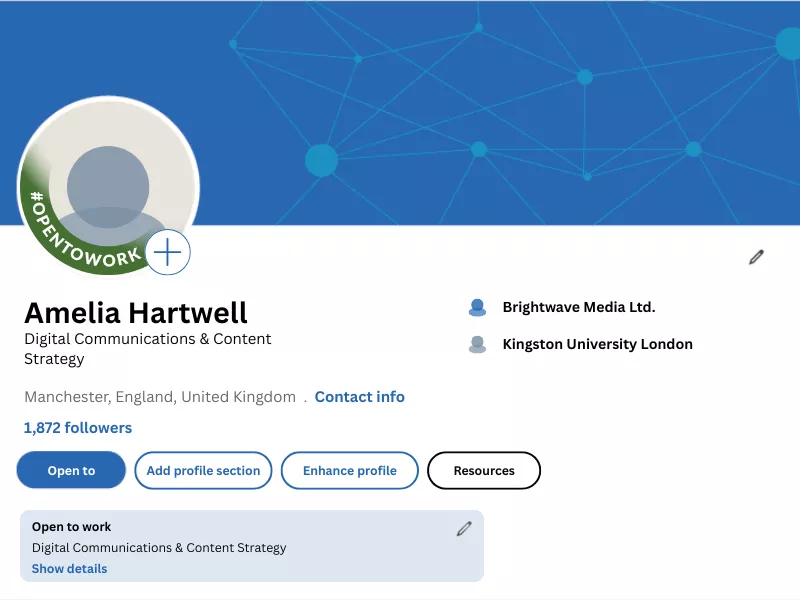
Before we go any further, let’s help you understand the benefits of the green frame on LinkedIn. Here’s how it can help you in your job search:
A. Increases Recruiter Visibility
Activating the feature makes you more likely to show up in recruiters’ searches. They can filter out candidates and increase the chances of receiving messages from recruiters.
B. Flexible Visibility Settings
You have the option to choose the visibility of your frame. It is recommended to select ‘share with recruiters only’ and not select ‘share with all LinkedIn members.’ The private option let recruiters know you’re open to work without notifying the people in the company you are currently working for.
C. Speeds Up the Job Search
The frame can help get job opportunities delivered directly. The LinkedIn app open to work reduces the time it takes to hear back after applying.
D. Increases Engagement
The feature can help get more responses from your network, as it prompts friends, former colleagues, and other connections to share openings and make introductions.
E. Provides a Clear Signal
When you use the open to work, you clearly communicate that you are open to new opportunities to recruiters and your professional network.
F. Easy to Use and Remove
It is easy to use, and you will have no problem removing open to work LinkedIn if you feel it’s not working for you.
There’s more to the feature, and you can use open-to-work beyond just showing the badge.
Improving the Usage of the Open to Work Feature beyond the Badge
Many job seekers do not understand how the feature has more usage than the badge. The following are a few points that can help you improve the usage of this feature:
- Tailored LinkedIn Posts – Create strategic posts announcing your availability using specific job titles, industry keywords, and hashtags.
- Director Recruiter Engagement – Comment on recruiters’ posts or send connection requests to recruiters, highlighting your Open to Work status and skills to build an immediate connection.
- Headline and Summary Optimisation – Make sure to update your headline, including target roles, and craft a summary highlighting your achievements.
- Skills and Endorsement Boost – Add relevant UK-specific skills, ask for endorsements from connections, and request recommendations when the badge is active.
- Content Creation Synergy – You can share industry insights or case studies along with the badge to demonstrate expertise, prompting network referrals and recruiter InMails.
But is this enough to get you hired? Let’s answer that in the following section.
Can the Open to Work LinkedIn Feature Get You Hired?
There’s no correct answer to this question. In some cases, the feature did get people hired, while in some cases, candidates have complained about getting spam messages from recruiters.
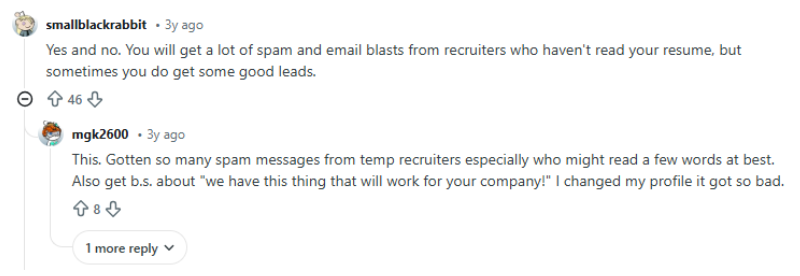
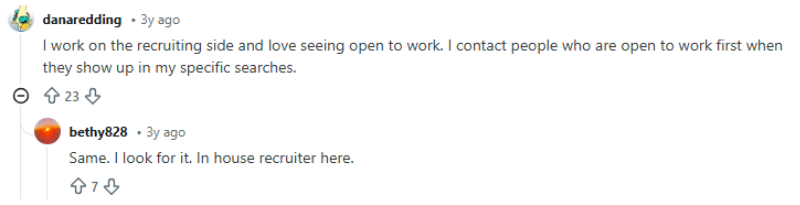
On the other hand, a few recruiters have said they connect with candidates who have the opentowork frame first before looking for other candidates.
We have talked to numerous job applicants and recruiters and asked them about the significance of the feature, and this is what we have understood:
- The feature lets recruiters know that you’re looking for work and increases the chances of your profile being viewed by them.
- The search for candidates in the case of recruiters gets easier when the feature is turned on.
- You start getting job opportunities that align with your preferences.
- However, this is not the only factor that can get you hired. It increases the chances of getting called for an interview, but getting hired depends on your skills and knowledge.
In a nutshell, this LinkedIn feature is significant in the job search process, but it does not guarantee a job. For those searching for a job, the frame can be of great help to know about the opportunities and even to get a call from a recruiter. But should you use LinkedIn’s open to work feature? Let’s know the truth about the green photo frame.
Is OpentoWork Photo Frame Working Against You [Know the Truth]?
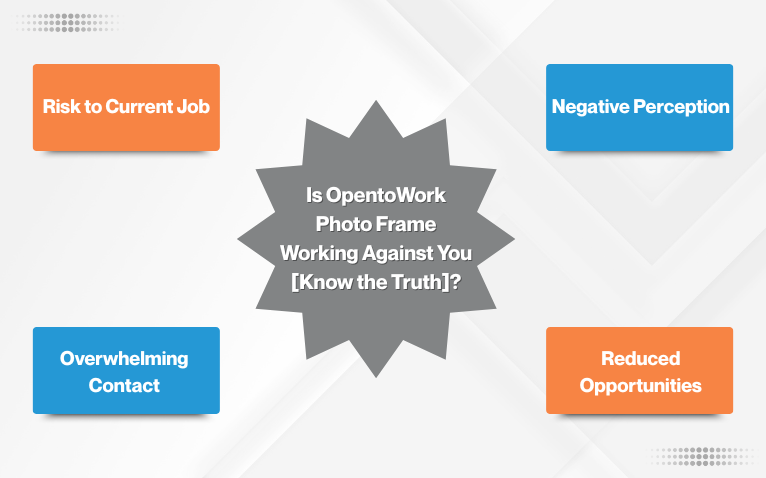
There’s a lot to know before switching on the open to work feature on LinkedIn. Since most of you feel that this gives a roadmap for all looking for a job, there’s a hidden truth that you ignore. We have already talked about the privacy settings, and now let’s take you through the reasons the green photo frame around the profile picture might work against you:
A. Risk to Current Job
Your current employer might understand that you are looking for a new job, and that can have negative consequences. Even with the privacy settings, the recruiters at your current company might come across your profile.
B. Negative Perception
There are a few professionals who feel the frame can make them appear desperate or less competitive. There are also chances that the frame can create a perception of being one in a large group of ‘commoditised’ job seekers.
C. Overwhelming Contact
Adding the frame to your profile might result in a massive inflow of inMails, messages, and requests from recruiters, some of which can also be of no use.
D. Reduced Opportunities
Recruiters with a premium LinkedIn Recruiter membership will only be able to see if you share the status. It leads to reduced opportunities as your profile will not be seen by all potential employers.
Now that brings us to the question: what are the other ways you can tell people that you are open to work? Let’s answer that in the next section.
What Are the Other Ways You Can Tell People that You’re Open to Work?
In case the green frame is not working for you, it is essential to know about the other ways you can tell people that you’re open to work. Here’s how you can do that:
- Create a detailed and optmised LinkedIn profile stating your goals, skills, and the type of roles you’re interested in. Use keywords that can help recruiters find you.
- Active networking with professionals in your industry, joining different groups, and engaging with LinkedIn posts for increasing visibility and building relationships. This can lead to referrals.
- Strategic use of social media platforms. Create content related to your field, comment on industry topics, and follow companies that interest you. This will get you noticed beyond the job boards.
- Set job alerts by filtering job titles and for company career pages to stay updated and apply promptly to openings that are relevant to your skills and goals.
- You can also consider creating a website or a portfolio showcasing your work, projects, and testimonials. This will act as a hub that is linked to your social profiles.
- You can also create a post on LinkedIn stating your skills, experience, and knowledge, and the position you are looking for.
The green banner has a lot of significance, without a doubt, but there are concerns regarding its usage and how it might be perceived by others. Therefore, to ensure you get your next job opportunity, use it strategically. Further, you must also know how to remove open to work LinkedIn frame when you get placed in a position you were looking for.
How to Turn Off Open to Work LinkedIn Feature?
In the case where you have got a job relevant to your work experience and skills, it is ethical to turn off the LinkedIn open to work feature. Here’s how you can do it:
- Go to your LinkedIn profile
- Access the edit section and click the “open to work” button
- Delete the “open to work” feature
- Confirm the deletion
- Refresh the page
This way, you can turn off open to work LinkedIn mobile iPhone, or PC.
To End with,
The open-to-work feature has proved to be useful for many candidates across the globe. It helps recruiters see that you’re looking for a job opportunity and view your profile. Undeniably, LinkedIn can be an invaluable platform for budding professionals as well as experienced professionals. However, it is essential for both to understand the ways to use this feature.
Further, you also need to understand that switching this on does not guarantee a job. It allows you to find more jobs and increases your chances of being called for an interview. Recruiters and hiring managers can connect with you and review your profile before calling you for an interview. Therefore, understand the usage and use the feature strategically for better results.
Frequently Asked Questions
How to add open to work on LinkedIn?
Here are the steps that you need to follow to add Open to Work on LinkedIn:
- Go to your profile and click the ‘open’ button under your current job title
- Select ‘finding a new job’ and choose the roles, location, and job types you prefer
- You can share with all LinkedIn members or recruiters
How long does Open to Work stay on LinkedIn?
The Open to Work stays active until you remove it. LinkedIn makes it visible to all LinkedIn members or only recruiters, depending on your privacy settings. You can also learn how to change open to work on LinkedIn to switch it on or off.
Should I put Open to Work on LinkedIn?
Yes, you should put open to work if you are looking for a new opportunity or are open to considering a new opportunity. Recruiters may reach out frequently because your profile appears in searches for passive candidates and active job seekers.
How to hide open to work from current employer on LinkedIn?
If you want your current employer or people at your current company not to see it, select the option of let recruiters know that you’re open but don’t share with all LinkedIn members.
Can open to work get me more job offers on LinkedIn?
Turning on the feature can help you get a job faster. Your profile becomes more visible to recruiters on LinkedIn, and you may receive more InMails from recruiters.
What do recruiters see when someone marks open to work on LinkedIn?
When you turn on the feature, the people using LinkedIn Recruiter will know you’re open to work. The preferences you set will also help them understand whether you’re open to considering a new role. Recruiters may also look at whether you’ve been active on LinkedIn and if your skills match their open roles.
How useful was this post?
Click on a star to rate it!
Average rating / 5. Vote count:
No votes so far! Be the first to rate this post.
We are sorry that this post was not useful for you!
Let us improve this post!
Tell us how we can improve this post?

Want To See My Profile — Click Here Elise
- Listing Hobbies and Interests for CV in 2026 | What to Include and Avoid? - December 6, 2025
- How to Use LinkedIn Open to Work Feature: An Insight for Job Seekers - November 27, 2025
- LinkedIn Headline Examples: The Ultimate Guide to Get Noticed - June 18, 2025

