
Landing your dream job requires more than just impressive qualifications. With 75% of CVs never reaching human eyes, understanding how to create an ATS friendly CV has become essential for UK job seekers. This guide shows you exactly how to create an ATS-friendly CV that passes automated screening whilst still impressing human recruiters. You’ll discover which formatting choices are killing your chances, how to incorporate the right keywords, and get proven templates that actually work.
Key Takeaways
- ATS systems screen 99% of Fortune 500 company applications and are increasingly used by UK employers of all sizes
- Simple formatting beats creative design when it comes to passing ATS CV scanners
- Keyword optimisation is crucial – mirror language from job descriptions throughout your CV
- File format matters – .docx files are typically safer than PDFs for ATS compatibility
- Standard section headings help ATS software correctly categorise your information
What Is ATS Friendly CV?
An ATS-friendly CV is a curriculum vitae specifically formatted and written to be easily read by Applicant Tracking System (ATS) software. These sophisticated programmes scan, parse, and rank CVs before they ever reach a recruiter’s desk.
ATS stands for Applicant Tracking System, a software that UK employers use to manage the recruitment process. The system collects applications, extracts relevant data, searches for specific keywords, and ranks candidates based on how well their CVs match the job application. Understanding how an ATS works is the first step to ensuring your CV gets through the initial screening. Visit our CV Writing Company page for professional assistance. They can help you create a polished document that CV ATS systems will love.
Think of an ATS CV as a bridge between you and the hiring manager. It needs to satisfy both the cold logic of software algorithms and the human desire for compelling career stories. Many qualified candidates lose opportunities simply because their CV formatting confused the ATS, not because they lacked the right skills. Making your CV look professional while remaining ATS-friendly is entirely possible with the right approach. For guidance on showcasing your technical abilities effectively, see our guide on IT Skills For CV.
Step-by-Step Guide: How to Create an ATS-Friendly CVs?

When you want your CV to succeed, follow these steps to create an ATS-friendly CV that gets results, as this is a vital component of how to find a job fast through online application systems. Many job seekers rely on ATS software to check their applications, so optimising for ATS is crucial.
Step 1: Choose Your CV Format Wisely
Start with an ATS friendly CV template UK that uses even for Self-emplyed CV:
- Single-column layout
- Standard fonts
- Clear section headings
- Minimal formatting
Avoid templates marketed as “creative,” “modern,” or “eye-catching” – these usually fail ATS screening. Use an ATS CV template designed specifically to pass the ATS. A simple CV template is your best bet.
Step 2: Structure Your Contact Information in CV Format
Place this at the top of your Graduate CV body (not in the header):
- Full name (larger font, bold)
- Location (city and postcode)
- Phone number
- Professional email address
- LinkedIn profile URL (optional but recommended)
This ensures your CV is a document that both ATS systems and recruiters can easily read your CV without issues.
Step 3: Craft a Keyword-Rich Professional Summary in CV Format
Write 3-4 sentences that include:
- Your current job title or professional identity
- Years of experience
- Top 3-5 relevant skills from the job description
- One quantifiable achievement
This creates a CV for specific positions that immediately catches attention. When done right, you can practically create your CV in minutes using this focused approach.
Example:
“Results-driven Marketing Manager with 7+ years’ experience in digital strategy, SEO, and content marketing. Proven track record of increasing organic traffic by 150% and improving conversion rates by 35%. Skilled in Google Analytics, HubSpot, and social media management with expertise in B2B marketing campaigns.”
If you already have a draft ready but do not know how to optimise or structure, taking professional CV editing service can be helpful.
Step 4: List Your Key Skills
Create a dedicated skills section with 8-12 relevant abilities. This section helps you showcase the most important skills for CV to highlight your qualifications:
- Mix hard skills and soft skills
- Use exact terminology from job descriptions
- Include industry-specific software and tools
- Avoid generic terms like “team player” or “hard worker”
An ATS-friendly UK CV format includes a clear skills section that’s easy for software to identify.
Step 5: Detail Your Work Experience
For each position, include:
- Job title (bold)
- Company name and location
- Employment dates (month/year format)
- 3-5 achievement-focused bullet points that:
- Start with strong action verbs
- Include quantifiable results
- Incorporate relevant keywords naturally
- Focus on accomplishments, not just responsibilities
Use a reverse chronological or hybrid CV format, which is what most ATS-friendly CV formats follow.
Example Bullet Point:
“Led cross-functional team of 12 to deliver £2.5M project 3 weeks ahead of schedule, reducing costs by 18% through streamlined processes and vendor negotiation.”
Step 6: Add Your Education
List your qualifications in reverse chronological order:
- Degree name and classification
- University name
- Graduation year
- Relevant coursework or dissertation title (if recent graduate)
Include unskilled CV examples in mind when formatting this section—keep it clear and consistent.
Step 7: Include Additional Sections (When Relevant)
Consider adding:
- Certifications: Professional qualifications with issuing body and year
- Languages: Proficiency levels using standard descriptors
- Professional Memberships: Industry associations and membership levels
- Volunteer Work: Relevant unpaid experience
If you need to Update My CV with recent achievements, focus on quantifiable results that demonstrate impact. When you upload your CV to application systems, these additional sections can help you stand out.
Why UK Employers Use Applicant Tracking Systems in Job Search?
The rise of applicant tracking systems UK usage reflects dramatic changes in recruitment. Recruiters and ATS software work together to help streamline the hiring process. Consider these realities:
- UK companies receive an average of 250 applications per corporate job posting
- Recruiters spend just 6-8 seconds initially reviewing each CV
- Manual screening of hundreds of CVs is time-consuming and costly
- Best applicant tracking system UK solutions help eliminate unconscious bias
Software ATS CV scanning provides several advantages for employers. It standardises the initial screening process, ensures compliance with employment law, reduces time-to-hire, and allows recruiters to focus on genuinely qualified candidates rather than administrative tasks. ATS screening has become a standard part of modern recruitment.
For larger organisations, applicant tracking software UK has become indispensable. However, small and medium-sized UK businesses increasingly adopt these systems as cloud-based solutions become more affordable. Once your CV passes the ATS, knowing How to End a CV professionally becomes equally important.
Essential Elements to Create an ATS-Friendly CV Format
Creating an effective ATS CV format requires attention to several critical elements. A good CV needs a proper structure to ensure both ATS software and human readers can easily scan your CV.
1. Standard Section Headings
Use conventional headings that the CV tracking system software recognises:
- Personal Details or Contact Information
- Professional Summary or Personal Statement
- Work Experience or Professional Experience
- Education
- Skills or Key Skills
- Certifications (if applicable)
- Additional Information (optional)
Avoid creative headings like “My Journey” or “What I Bring to the Table.” Whilst these might seem engaging to humans, they confuse ATS software. CV writing experts recommend using an ATS-compliant structure with clear, standardised format headings.
2. Clean, Simple Layout
Your ATS-friendly CV template should prioritise clarity over creativity. When you create your CV, focus on making it easier for the ATS to process:
- Use a single-column format (two-column designs often scramble during parsing)
- Stick to standard fonts: Arial, Calibri, Georgia, or Times New Roman
- Maintain 10-12 point font size for body text
- Use clear section divisions with white space
- Avoid text boxes, tables, and columns
- Never use images, charts, or graphics
While showcasing personality is valuable, remember that what is ATS-friendly CV design often means sacrificing visual flair for functionality. You can add personality through your Hobbies and Interests for CV section instead. An ATS-compliant CV doesn’t have to be boring—it just needs to be readable by both machines and humans.
3. Contact Information Placement
This is crucial: never place your contact details in the header or footer. ATS CV checker tools frequently fail to read information stored in these areas. To ensure your CV is ATS-friendly, place your contact information at the top of the page within the main body.
Instead, place your contact information at the top of the page within the main body:
John Smith
Manchester, UK | 07700 900000 | john.smith@email.com | LinkedIn: linkedin.com/in/johnsmith
4. Appropriate File Format
How to create ATS friendly CV files that actually get read? File format matters significantly. When you save your CV, choose wisely:
- .docx files are generally the safest choice for ATS compatibility
- PDF files preserve formatting but aren’t universally compatible with all ATS
- Plain text (.txt) files are ATS-friendly but limit formatting options
Unless the job posting specifically requests PDF, submit your ATS CV template UK as a .docx file. Using a CV builder can help ensure proper file formatting. If you want to address a career gap, you can look for a template that fits your requirements.
ATS Friendly CV Template Example
Here’s a complete ATS CV template structure you can follow. This ATS-friendly CV example shows the ideal layout. Use this as your CV headline guide and overall structure reference:
SARAH JOHNSON
London, UK | 07700 123456 | sarah.johnson@email.com | linkedin.com/in/sarahjohnson
PROFESSIONAL SUMMARY
Experienced Financial Analyst with 5+ years in corporate finance, budgeting, and financial modelling. Expertise in data analysis, forecasting, and presenting financial insights to senior leadership. Proficient in Excel, SAP, and Tableau with proven ability to reduce costs and improve profitability.
KEY SKILLS
Financial Modelling | Budget Management | Data Analysis | Forecasting | SAP | Excel (Advanced) | Tableau | Risk Assessment | Variance Analysis | Financial Reporting | Stakeholder Management | Process Improvement
PROFESSIONAL EXPERIENCE
Senior Financial Analyst
ABC Corporation Ltd, London, UK
March 2021 – Present
- Developed comprehensive financial models reducing forecasting errors by 35% and improving budget accuracy across 12 departments
- Managed annual budget of £8.5M, identifying cost-saving opportunities worth £450K through detailed variance analysis
- Created automated reporting dashboards in Tableau, reducing report generation time by 60%
- Collaborated with senior leadership to present quarterly financial reviews and strategic recommendations
- Led implementation of new SAP modules, training team of 8 analysts on advanced functionality
Financial Analyst
XYZ Financial Services, Birmingham, UK
June 2019 – February 2021
- Conducted monthly variance analysis for £5M operational budget, maintaining 98% accuracy rate
- Prepared detailed financial reports for C-suite executives, highlighting key trends and actionable insights
- Streamlined budget review process, reducing cycle time from 10 days to 6 days
- Assisted in quarterly audits, ensuring compliance with regulatory requirements and internal controls
Junior Financial Analyst
DEF Enterprises, Manchester, UK
September 2017 – May 2019
- Supported senior analysts with data gathering, financial modelling, and report preparation
- Analysed financial statements and identified discrepancies, improving data quality by 25%
- Created Excel templates automating routine calculations, saving 15 hours per month team-wide
EDUCATION
Bachelor of Science (BSc) in Accounting and Finance – First Class Honours
University of Manchester
Graduated: July 2017
CERTIFICATIONS
- Chartered Financial Analyst (CFA) Level II Candidate – Expected completion June 2026
- Advanced Excel and Financial Modelling Certificate – Corporate Finance Institute, 2020
PROFESSIONAL MEMBERSHIPS
- Association of Chartered Certified Accountants (ACCA) – Affiliate Member
This template demonstrates proper ATS-friendly CV structure with clear sections, appropriate keywords, and quantifiable achievements. It’s optimised for ATS while remaining readable for humans. This is what a hybrid CV optimised for modern recruitment looks like. You have to add these things in your executive CV too, know how to write an executive CV to get help.
Keyword Optimisation: The Heart of ATS Success
The importance of keywords in modern CVs cannot be overstated. This is where most candidates either succeed brilliantly or fail. Keeping your CV updated with relevant keywords is essential for ATS success.
How to Identify the Right Keywords?
Follow this systematic approach for ATS CV keyword optimisation:
- Analyse the Job Description: Print out or save 3-5 similar job postings for roles you’re targeting
- Highlight Repeated Terms: Circle skills, qualifications, and responsibilities mentioned multiple times
- Note the Exact Phrasing: If the posting says “project management,” use that exact phrase rather than “managed projects.”
- Include Both Variations: Use full terms and common abbreviations (e.g., “Search Engine Optimisation (SEO)”)
- Prioritise Hard Skills: Technical abilities and specific software names are particularly important
When crafting a CV, pay close attention to keywords from the job posting. This helps you pass the ATS and ensures recruiters and ATS systems recognise your qualifications.
Understanding the Importance of Keywords in Modern CVs helps you create a document that performs well in both automated and human screening. A good CV balances keyword density with readability.
Industry-Specific Free ATS Tips
Different sectors have unique ATS CV requirements. Here’s how to use ATS-friendly strategies for various industries:
Technology Sector
- List programming languages and frameworks prominently
- Include GitHub or portfolio links
- Specify version numbers for software (e.g., “Python 3.9“)
- Mention methodologies (Agile, Scrum, DevOps)
Healthcare
- Include professional registration numbers
- List clinical skills and specialisations
- Mention specific medical software systems
- Detail continuing professional development (CPD)
Finance and Accounting
- Specify financial software expertise (SAP, Oracle, QuickBooks)
- Include relevant professional qualifications (ACCA, CIMA, CFA)
- Highlight regulatory knowledge
- Quantify financial achievements (budgets managed, savings generated)
Marketing and Creative Industries
- Balance creativity with ATS requirements
- List digital marketing tools (Google Analytics, HubSpot, Mailchimp)
- Include campaign metrics and results
- Mention certifications (Google Ads, Meta Blueprint)
Understanding these nuances helps you make your CV stand out in your specific field while remaining ATS-friendly. You must also use this while writing a personal statement for board position.
How to Test Your ATS-Friendly CV?

Before submitting applications, verify your ATS CV will perform well. Make sure you are not submitting ChatGPT-Written CVs. Testing helps ensure your CV won’t be rejected due to technical issues. These free ATS testing methods can save you from rejection:
Method 1: The Plain Text Test
- Copy all content from your CV
- Paste it into a plain text editor (Notepad on Windows, TextEdit on Mac)
- Review the result:
- Is the information in the correct order?
- Are sections clearly identifiable?
- Do dates and formatting remain intact?
- Is any content missing or garbled?
If the plain text version looks disorganised, your ATS-friendly CV format needs adjustment. This simple test shows how ATS software to help streamline will process of your document.
Method 2: Use an ATS CV Checker Tool
Several free ATS scanners can scan your CV. An ATS checker provides valuable feedback:
- Jobscan (compares your CV against specific job descriptions)
- Resume Worded (provides ATS compatibility score)
- TopResume (offers free ATS analysis)
These ATS CV checker tools identify specific issues and suggest improvements. They show you exactly what needs fixing to optimise your CV.
Method 3: Professional CV Review
Consider professional CV Writing services that understand ATS requirements. Expert writers can ensure your CV satisfies both automated systems and human recruiters.
Beyond the ATS Checker: Making Your CV Human-Friendly Too
Remember, passing the ATS CV checker is just the first hurdle. Your CV ATS must also impress human recruiters. The CV is a document that needs to work on two levels. Keeping your CV human is important, and you can do that by following these tips:
Balance ATS-Friendly CV
- Use ATS keywords naturally within proper sentences
- Tell compelling stories about your achievements
- Demonstrate progression and growth in your career
- Show personality through accomplishment descriptions
Making an ATS-friendly document doesn’t mean creating robotic content. Find the balance.
Quantify Everything Possible
Numbers stand out to both ATS algorithms and human eyes:
- “Increased sales by 42%” beats “Increased sales significantly”
- “Managed team of 15” beats “Managed large team”
- “Reduced costs by £125K” beats “Achieved substantial cost savings”
This is easier for the ATS to process and more impressive for humans to read.
Tailor Each Application
Never send the same ATS-friendly CV to multiple positions. Customise for each role:
- Adjust keywords to match the specific job description
- Reorder skills to prioritise the most relevant ones
- Emphasise the experience most applicable to the position
- Modify professional summary to align with role requirements
This approach might seem time-consuming, but it dramatically improves your success rate. Quality applications outperform quantity every time. Each CV ats submission should feel custom-tailored.
Common ATS CV Mistakes to Avoid
Even with good intentions, many candidates sabotage their applications with these errors. Understanding what makes your CV need improvement is essential for success. Here are tips for ATS compliance:
1. Using Complex Formatting
The Problem: Tables, text boxes, columns, and creative layouts confuse ATS parsing algorithms. Your CV format may look attractive, but it fails to pass the ATS screening.
The Solution: Stick to a straightforward, single-column format with standard bullet points. Think ATS-friendly over visually complex.
2. Incorrect File Naming
The Problem: Filenames like “CV.docx” or “CV_Final_FINAL_v3.docx” look unprofessional.
The Solution: Use a clear format: “FirstName_LastName_CV.docx” (e.g., “John_Smith_CV.docx”)
3. Overusing Graphics and Images
The Problem: Photos, logos, charts, and infographics cannot be read by most ATS CV checker systems. The ATS CV parser simply skips these elements.
The Solution: Remove all visual elements except simple, solid bullet points. Your CV for ATS should be text-based.
4. Neglecting Keyword Variations
The Problem: Using only one version of a skill (e.g., “SEO” but not “Search Engine Optimisation”).
The Solution: Include both acronyms and full terms: “Search Engine Optimisation (SEO)”. This improves your ATS compatibility score significantly.
5. Fancy Fonts and Unusual Characters
The Problem: Decorative fonts and special characters often appear as errors or symbols to ATS.
The Solution: Use standard fonts and basic punctuation only. Remember, ATS systems prioritise readability over aesthetics.
6. Listing Skills Without Context
The Problem: Crafting a CV by simply listing keywords without demonstrating their application flags you as potentially unqualified.
The Solution: Reference skills in your professional summary and show how you’ve used them in your work experience section. This is key to using an ATS-optimised strategy.
7. Inconsistent Date Formatting
The Problem: Mixing formats (Jan 2025, 01/2025, January 2025) confuses ATS chronological tracking.
The Solution: Choose one format (e.g., “January 2025” or “01/2025”) and use it consistently throughout your ATS-friendly CVs.
How Does an ATS CV Checker Work?
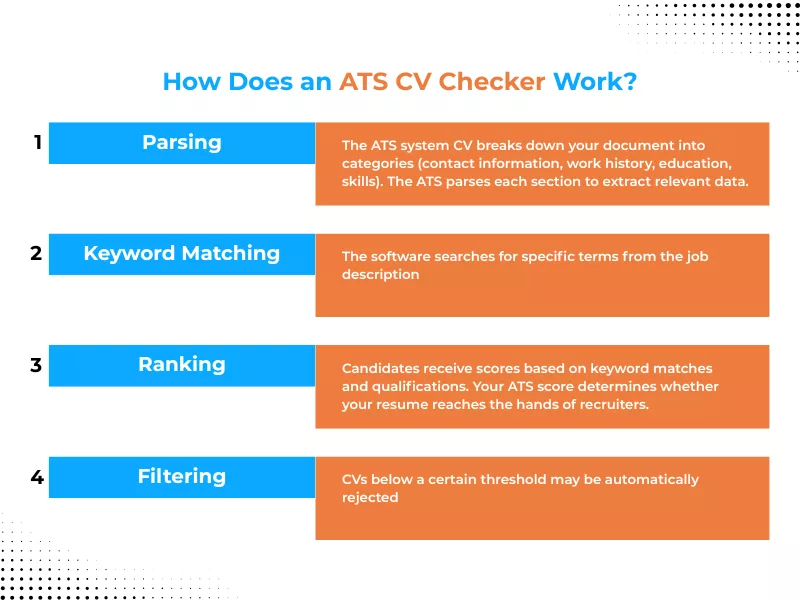
Understanding how to check my CV is ATS friendly starts with knowing what these systems actually do. When you upload your existing CV to an application portal, here’s the process:
- Parsing: The ATS system CV breaks down your document into categories (contact information, work history, education, skills). The ATS parses each section to extract relevant data.
- Keyword Matching: The software searches for specific terms from the job description
- Ranking: Candidates receive scores based on keyword matches and qualifications. Your ATS score determines whether your CV reaches the hands of recruiters.
- Filtering: CVs below a certain threshold may be automatically rejected
CV applicant tracking system software looks for both hard skills (specific technical abilities) and soft skills (communication, leadership). It evaluates how frequently relevant terms appear and where they’re positioned within your CV. The goal is to pass the ATS scan by including keywords from the job description naturally throughout your document.
Modern ATS systems UK use increasingly sophisticated algorithms, with some incorporating artificial intelligence. However, they still struggle with complex formatting, unusual fonts, and creative design elements. Ways to ensure your CV is properly formatted include using simple layouts and standard fonts. To maximise your chances, ensure you’re highlighting the right Skills for CV that match your target role.
Final Thoughts: Create Your CV for ATS
Creating an ATS-friendly CV UK doesn’t mean sacrificing quality or personality. It means being strategic about how you present your qualifications to ensure they’re seen by both machines and humans. The most successful job seekers understand that optimising for ATS is simply the first step in a comprehensive application strategy.
Start by auditing your current CV against the guidelines in this article. Choose or create an ATS-friendly CV template with simple, clean formatting that prioritises readability. Research your target roles carefully and compile relevant keywords that appear consistently across job descriptions.
The goal isn’t just to pass the ATS – it’s to secure interviews. Your ATS CV should open doors by showcasing your qualifications in language that resonates with both software algorithms and human decision-makers. Track your results and refine your approach based on the interview invitations you receive.
Frequently Asked Questions
Which CV sections matter most for ATS parsing?
The most important sections for ATS parsing are Work Experience, Skills, and Education, because they hold the job titles, dates, keywords, and qualifications that the system scores. Clear section headings like “Work Experience” and “Skills” help ATS recognise and correctly categorise your information.
How to match CV keywords to a job description?
Scan the job description and highlight repeated skills, tools, and qualifications, then use those exact phrases in your summary, skills list, and relevant experience bullets. Make sure each keyword appears in a natural context that proves you actually used that skill or tool.
How to write an ATS-friendly professional summary?
Write a 2–4 line summary that states your role, years of experience, main strengths, and 4–6 keywords pulled from the job ad. Keep it in plain text with no graphics or special characters so ATS can parse every word.
How does your CV writing process work?
Once you place an order, you complete a brief questionnaire or share your existing CV so our UK-based writer can understand your background and target roles. Your dedicated writer then drafts a bespoke, ATS-optimised CV and collaborates with you via email, calls, or messages until you are fully satisfied.
How long does it take to receive my new CV?
Standard turnaround for most CV, cover letter, and LinkedIn projects is 3–5 working days from your initial consultation. If you need documents sooner, you can choose an express option at checkout for a faster 24–48-hour delivery window.
Can you work with my existing CV instead of starting from scratch?
Yes, our CV Editing Service is designed specifically to refine and modernise your existing CV. Your writer will improve structure, language, and ATS keywords while preserving your key experience, achievements, and personal voice.
How useful was this post?
Click on a star to rate it!
Average rating / 5. Vote count:
No votes so far! Be the first to rate this post.
We are sorry that this post was not useful for you!
Let us improve this post!
Tell us how we can improve this post?

Want To See My Profile — Click Here Jonathan
- OKR vs KPI: What’s the Difference? (With UK Workplace Examples) - August 14, 2026
- 25+ Questions to Ask the Interviewer at the End of an Interview - August 8, 2026
- Video Interview Tips UK: How to Succeed in a Remote Job Interview - July 3, 2026
